> ## Documentation Index
> Fetch the complete documentation index at: https://docs.nylon.dev/llms.txt
> Use this file to discover all available pages before exploring further.
# Request logs
> Every API request made with your keys, with its body, its response and how long it took.
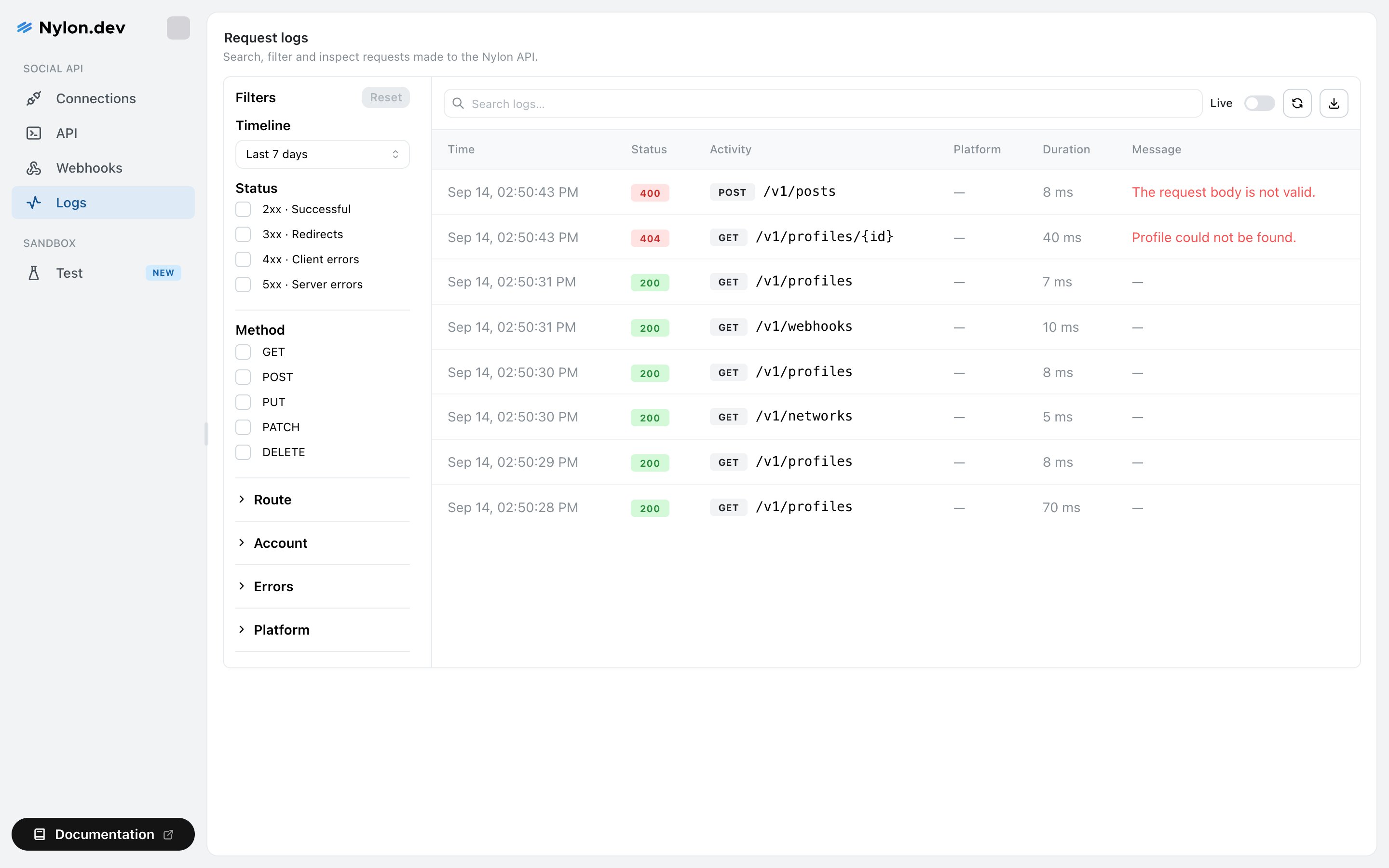
Select **Logs** in the sidebar. Nylon records every request made with your API keys — method, path, status, duration, and the full request and response bodies — so you can answer "what did we actually send" without adding logging to your own service.
 ## What a row shows
| Column | What it is |
| ------------ | --------------------------------------------------------------------------- |
| **Time** | When the request arrived. |
| **Status** | The HTTP status, colour-coded — green under 300, blue under 400, red above. |
| **Activity** | The method and path, for example `POST /v1/posts`. |
| **Platform** | The network involved, when the request concerned one. |
| **Duration** | How long Nylon took, in milliseconds. |
| **Message** | The error, if there was one, otherwise a summary of the response. |
Select a row to open it. You get the endpoint, the full request body, the full response body, and — where the request concerned a specific account — the platform, the account and the error code.
## Filtering
The filter sidebar narrows the list. **Timeline** is the one that matters most, because it also determines what the other filters can offer: the **Account** and **Errors** dropdowns are built from what is actually in the selected range, so widening the range surfaces more options.
| Filter | Options |
| ------------ | ------------------------------------------------------------------------------- |
| **Timeline** | Last hour, 24 hours, 7 days, 30 days, 90 days, or all time. Defaults to 7 days. |
| **Status** | 2xx, 3xx, 4xx, 5xx. |
| **Method** | GET, POST, PUT, PATCH, DELETE. |
| **Route** | One endpoint path. |
| **Account** | One connected social profile. |
| **Errors** | One error code and message that actually occurred in the range. |
| **Platform** | One or more networks. |
**Reset** clears everything at once. The search box above the table matches across the logged requests as well.
## Live mode
The **Live** switch above the table keeps the list refreshing as requests arrive. Useful while you are running a deploy or testing a new integration; turn it off when you want to read something without it moving.
## Export
The download icon exports the rows currently on screen as CSV — filters applied. Handy for handing an incident to someone who does not have a Nylon login.
## Whose requests you see
API keys are owned by the person who created them, and the Logs page shows requests made with **your** keys. A teammate's key produces requests in their log view, not yours.
If you cannot find a request you know was made, check whether it used a key one of your teammates created.
## What is redacted
Anything that looks like a credential is redacted before the body is stored. Any field whose name contains `authorization`, `password`, `secret`, `token`, `api key` or `credential` is replaced with `[REDACTED]`, at every level of a nested body.
Everything else in the body is stored as sent — including post content and media URLs.
## Related
Working from a red row to a cause.
The error taxonomy, and what each code means.
## What a row shows
| Column | What it is |
| ------------ | --------------------------------------------------------------------------- |
| **Time** | When the request arrived. |
| **Status** | The HTTP status, colour-coded — green under 300, blue under 400, red above. |
| **Activity** | The method and path, for example `POST /v1/posts`. |
| **Platform** | The network involved, when the request concerned one. |
| **Duration** | How long Nylon took, in milliseconds. |
| **Message** | The error, if there was one, otherwise a summary of the response. |
Select a row to open it. You get the endpoint, the full request body, the full response body, and — where the request concerned a specific account — the platform, the account and the error code.
## Filtering
The filter sidebar narrows the list. **Timeline** is the one that matters most, because it also determines what the other filters can offer: the **Account** and **Errors** dropdowns are built from what is actually in the selected range, so widening the range surfaces more options.
| Filter | Options |
| ------------ | ------------------------------------------------------------------------------- |
| **Timeline** | Last hour, 24 hours, 7 days, 30 days, 90 days, or all time. Defaults to 7 days. |
| **Status** | 2xx, 3xx, 4xx, 5xx. |
| **Method** | GET, POST, PUT, PATCH, DELETE. |
| **Route** | One endpoint path. |
| **Account** | One connected social profile. |
| **Errors** | One error code and message that actually occurred in the range. |
| **Platform** | One or more networks. |
**Reset** clears everything at once. The search box above the table matches across the logged requests as well.
## Live mode
The **Live** switch above the table keeps the list refreshing as requests arrive. Useful while you are running a deploy or testing a new integration; turn it off when you want to read something without it moving.
## Export
The download icon exports the rows currently on screen as CSV — filters applied. Handy for handing an incident to someone who does not have a Nylon login.
## Whose requests you see
API keys are owned by the person who created them, and the Logs page shows requests made with **your** keys. A teammate's key produces requests in their log view, not yours.
If you cannot find a request you know was made, check whether it used a key one of your teammates created.
## What is redacted
Anything that looks like a credential is redacted before the body is stored. Any field whose name contains `authorization`, `password`, `secret`, `token`, `api key` or `credential` is replaced with `[REDACTED]`, at every level of a nested body.
Everything else in the body is stored as sent — including post content and media URLs.
## Related
Working from a red row to a cause.
The error taxonomy, and what each code means.